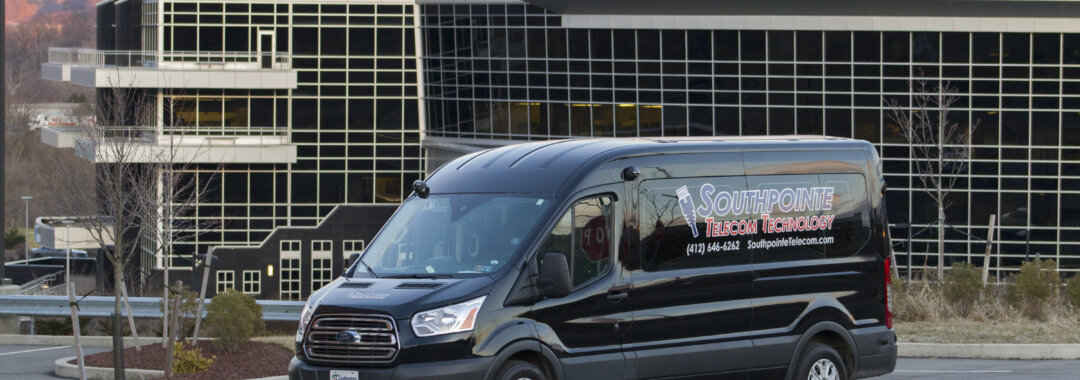
We discovered a need for our team to show up with our Tactical Mobile Unit with everything needed to complete our low-voltage telecommunications and IT jobs in a timely and efficient manner.
The Southpointe Telecom Difference
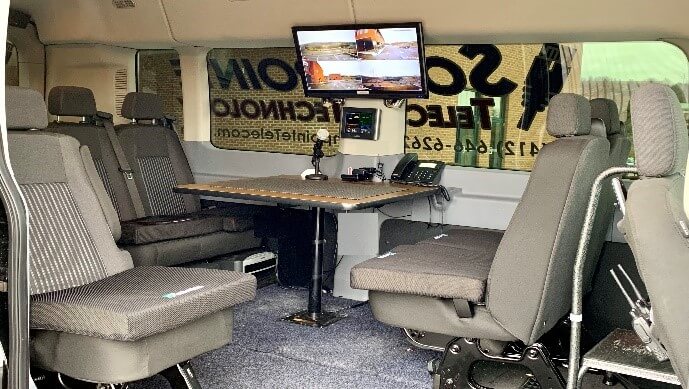
The Southpointe Telecom Tactical Mobile Unit (TMU) is a custom modified van with an office and workshop built in. Included is an office VOIP phone, Verizon high speed wireless hotspot, safety security cameras with remote monitoring, AC power inverters, conference/shop table, and a 3.5KV generator when needed for sites without power.
In the attached trailer are OSHA approved ladders of 4ft, 6 ft, 8 ft, and 20 ft plus portable work tables and carts.
Inventory includes over 4,000 ft. of Cat5 and Cat 6 computer cabling, a complete set of hand and power tools, various low voltage IT wall jacks, rough In boxes, extension cords, computer patch cords, computer switches, patch panels, and related replacement parts as needed for the specific job
Our staff of IT technicians has been background checked and drug free plus.
Our professionals have workmen’s compensation insurance, $1 million liability insurance, uniforms, safety equipment, and ongoing training. As career professionals they are well rewarded with retirement plans, vacation, sick days and incentives to complete a quality job on-time. All needed to keep a professional team without expensive staff turnover.
The cost for transporting is $1 per miles. This includes cost of fuel, oil changes, tires, state inspection, depreciation ($80,000 custom van and trailer), insurance, storage/parking equipment inventory, tools, ladders and support craft tool cases.
This represents a $250 value for a ½ hour drive to your site with our IT mobile unit with two technicians. What this value to you is the arrival of a professional team with the skills, tools, and transportation to provide a safe, quick, and efficient installation.
Questions about out products or services? Call us at (412) 646-6262
• Search for the free CoreNexa app in the Google Play store for Android users and the App Store for iPhone Users. • Download and Install the CoreNexa app.
Step 2: Signing into the Mobile App
Sign into the mobile app with the configured user names and passwords that you have set up in the VoIP configuration panel or with the info provided to you by Southpointe Telecom. After your first sign in you will be prompted to set your calling options. If accept inbound calls is selected the app will ring simultaneous with your desk phone.
Step 3: Choose calling preferences
When making or receiving calls from the CoreNexa mobile app it is highly recommended that you are connected to a stable WiFi network or in an area of consistent 4G cellular data. Without a quality connection users would experience poor call quality and call dropping. For best performace, choose only accepts calls via WiFi only.
Step 4: Giving the mobile app permissions
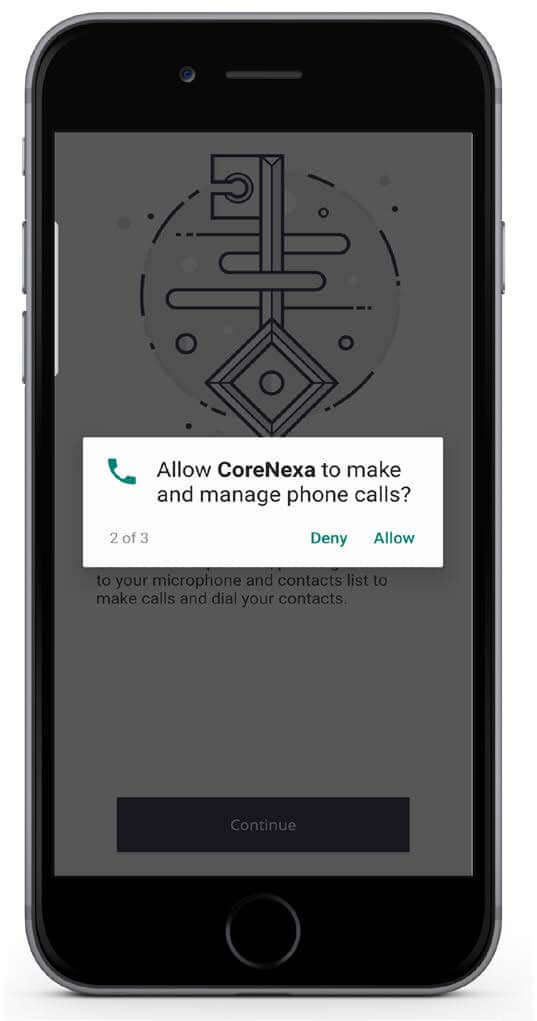
The Corenexa app will ask you to grant permissions to contacts, to make and manage phone calls, and for recording. These permissions must be granted to allow for full functionality of the app.
Finishing Installation
The mobile app is now installed. From the home screen you can make and receive calls, check voicemails, join conference bridges, and modify virtual attendants.
In the email recipient box enter the number you wish to send a fax to in the following format: 1@faxhd.com I.E. 13123240726@faxhd.com Please note the number you are sending it to must be preceded by the number 1 in order to send properly.
Attach the file you wish to fax.
The subject line may be used in lieu of a cover page or can be left blank. Text in the email body will not be sent
Send the email. You will then receive an email stating the fax has been queued successfully followed by either another email stating sent or failed to send.
Receiving a Fax
From a hosted fax configured email address. 1. In the email recipient box enter the number you wish to send a fax to in the following format: 1<number>@faxhd.com I.E. 13123240726@faxhd.com Please note the number you are sending it to must be preceded by the number 1 in order to send properly.
2. Attach the file you wish to fax.
3.The subject line may be used in lieu of a cover page or can be left blank. Text in the email body will not be sent.
4. Send the email. You will then receive an email stating the fax has been queued successfully followed by either another email stating sent or failed to send.
First time callers are great potential customers. Are you handling them professionally? Your company’s first impression starts with handling the first phone call. Most companies handle phone calls in a careless and unprofessional manor. Many employees consider a phone call an interruption to their regular work load. This attitude is picked up by callers.
Problems and solutions
Not answering phones in a timely and professional manor: With Southpointe Telecom Auto attendant we make sure every call is answered professionally with a custom pre-recorded greeting. “Happy holidays and thank you for calling Acme Company. Your call is important to us. For sales and first time callers, press 1, etc.
Your existing phone system does not present “friendly service options”: With our auto attendant we can give options such as sales press 1, service press 2, rental press 3.
Your phone calls are not answered while away from your desk or in a meeting, etc: With Southpointe Telecom, after ringing the desk four times the call can automatically transfer to cell phones or alternate extensions. This gives you coverage at all times.
Clients get caught in ‘voice mail jail’: This is when the client asks for a person but gets placed in a voice mail box instead. They then have to call back to ask for a live person. With Southpointe Telecom the caller can have options when trying to reach a person. I.e. This is Joe, sorry I’m out today, to leave a message press 1 to be transferred to my assistant. If it’s important to talk now, press 2 for my cell phone. (Then goes to another desk or cell phone)
Clients reach you after hours and have questions: With Southpointe Telecom you can leave information options. Our office is closed but we still have information. For web site press 3, for hours and directions press 4, for latest promotions and announcement press 5, for a menu press 6, for our upcoming lunch event press 7, to register for an appointment press 8, etc.
You’re paying too much for a fax line you often don’t use: Southpointe Telecom offers digital fax lines, virtual fax and email option for a fraction of cost with fax sent to your email or cell phone. No need to pay for that extra fax phone line, fax ink and paper.
Your client has dead air time when placed on hold: With Southpointe Telecom a custom message on hold is free. Choose your hold music or make a custom message such as ‘ask about our newest promotion, etc. all while on hold.
Southpointe VoIP phones allow for seamless connectivity between offices, home, and cell phones.
Your caller waits too long for a call transfer: Southpointe Telecom can ring multiple extensions when a person is on hold giving them quicker access to a live person.
Quality control and training are not implemented with your employees: With Southpointe Telecom all calls can be recorded for training and positive critique review. All orders can be recorded for proof of purchase.
working from home convenience: Callers can call your main number but be transferred to your home or cell phone. This can be changed daily or hourly as needed. Calls can be transferred easily from home to home.
Extra options free and available on Southpointe Telecom Phone Systems
Remote Paging: Paging can be made from any phone anywhere, even from a cell phone. Transfer calls between buildings and cities.
Call Activity Log: All calls in and out are logged for past information. I.e. number of calls made each day by extension, both incoming and outgoing.
Find Me Personal Assistant: With find me, calls can be held until the right person is reached. Pre screening allows you to hear who is calling before answering. You can leave the person a private message, example, sorry Harry, I’m on vacation. Try my email – joe@comcast.net
Small Company, Big Image: A one man company can have the sound of a large corporation. Example: Welcome to Joe’s remodeling, for sales press 1, for service press 2, for accounting press 3, for job application press 4. All can go to the same extensions or multiple cell phone numbers.
Caller ID routing: The system recognizes the caller number and automatically sends it to a pre-determined extension or mailbox.
Questions about your phone system? Call us at (412) 646-6262
Southpointe Telecom Technology is an excellent choice for general contractors wanting ‘one responsible’ vendor for telephone, security, computer cabling, door access and CCTV cameras. Our most recently completed project is the 277 bed student housing facility managed in Albany, NY. We worked with Jersen Construction on this 5 story building which is equipped with several unique Southpointe Telecom products. Most importantly, our systems are integrated into one computer allowing your staff or Southpointe Telecom engineers to provide remote maintenance by securely logging onto the system from our corporate office. How good were the results? We have been awarded a second 'twin' project just down the street with Jersen.
CCTV Cameras
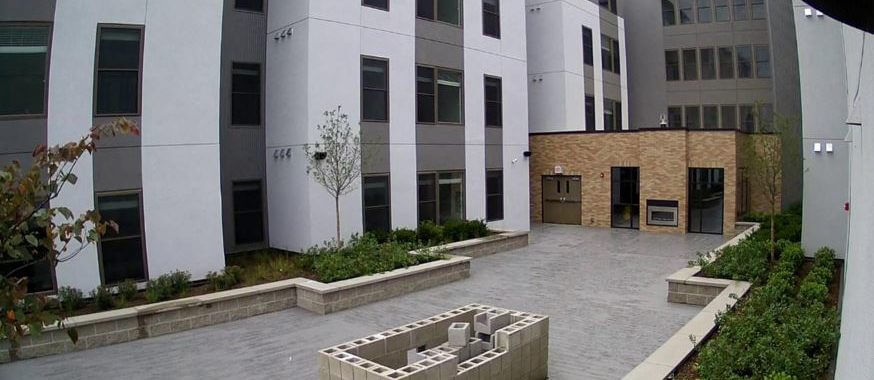
Southpointe Telecom installed over 55 IP (Internet Protocol) based security cameras. For maintenance reliability all cameras were split up on 3 computers. All pictures can be watched on a large screen TV, Iphone, Android or tablet devices with pass code protection. All cameras record movement with a time date stamp log making it easy to find an incident.
Card/Key Fob Door and parking lot Access Systems
Each student is given a keychain FOB with registered individual names logged on the computer for entry time, door and number. All entries can be verified on the CCTV camera recall system. Events are recorded 24/7 with time and date stamp. Elevators require key fob access to keep unwanted visitors out.
Sound board for music and paging entire building
Audio System
The student community room, and outside sun decks are equipment with high quality weatherproof stereo speakers. Students can select their own music using wireless Bluetooth connection to their phone or tablet. For special events, a wireless microphone is on hand for announcements.
VOIP Telephones
Southpointe Telecom uses the latest VOIP (Voice Over Internet protocol) based technology, making it easy to move phones between desks or connect/transfer callers to cell phones or home offices.
Computer network cabling
New construction cabling Complete internet cabling of CAT6 computer network, RG6 TV cabling and door lock access.
The District is an upscale gated community with complete security coverage.
We installed the following systems . . .
Digital locking Gate control for the swimming pool
Door control for office and community center
CCTV cameras for security at the pool and clubhouse
Alarm system for office security
Audio sound system for background music at the pool and office






 First time callers are great potential customers. Are you handling them professionally? Your company’s first impression starts with handling the first phone call. Most companies handle phone calls in a careless and unprofessional manor. Many employees consider a phone call an interruption to their regular work load. This attitude is picked up by callers.
 CCTV Cameras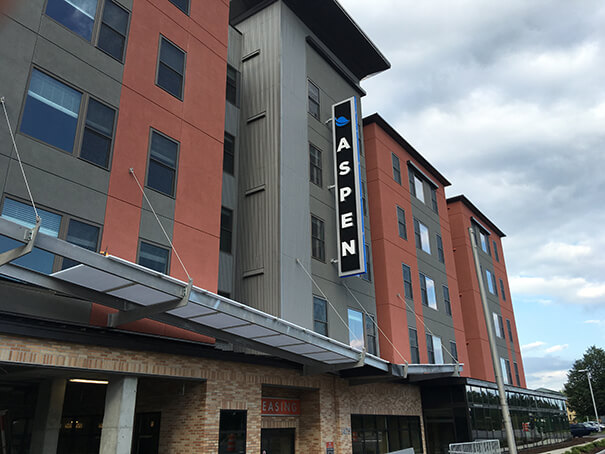

 Card/Key Fob Door and parking lot Access Systems
 Computer network cabling